Top 5 Nutrition Tracking Apps to Fuel Your Training
TOPIC: Nutrition
When you’re pushing for PRs in the gym, there’s one variable that matters just as much as your sets and reps: fuel. You can follow the best program in the world, but if your nutrition isn’t dialed in, your progress will reflect that (along with your energy and recovery).
Fortunately, nutrition-tracking apps have come a long way in the past few years, simplifying a previously tedious and painful process. Whether you want precise macro data, simple meal logging, or a fully guided diet strategy, these tools help you stay accountable and fuel your training the right way.
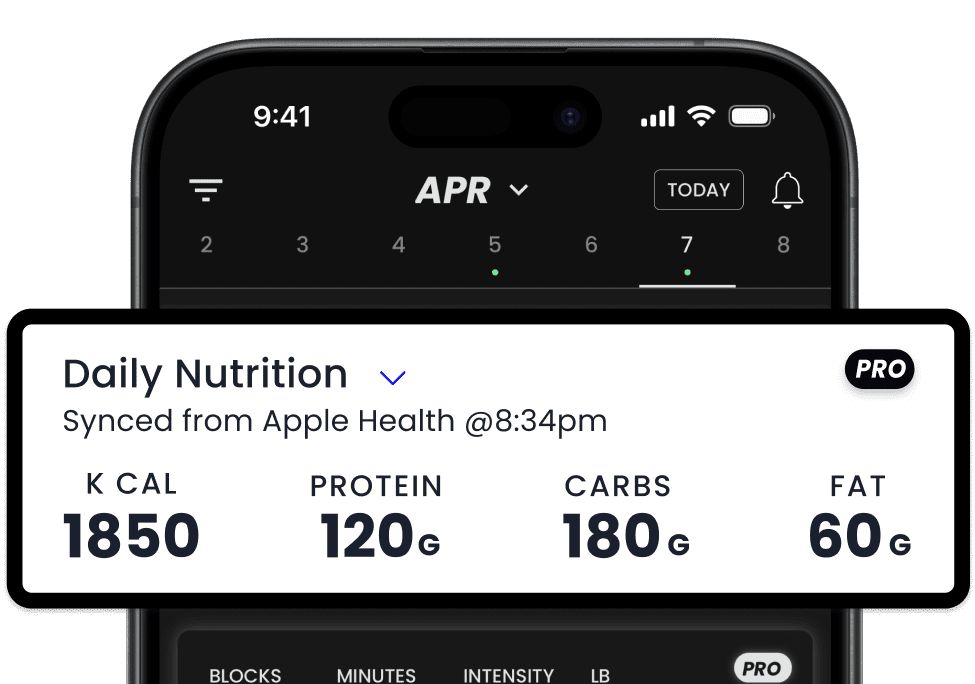
Better yet, TrainHeroic’s Nutrition tool (available for Athlete Pro users on iOS), can pull your macro/calorie data from your nutrition app of choice directly into TrainHeroic, making it easy to see how your fueling links to your training load, readiness, and performance. Click here to learn how to sync your app to TrainHeroic.
Below are the top five nutrition-tracking apps we recommend, and the best way to use them alongside TrainHeroic.

Written By
Molly Sughroue
Molly is a Content Strategist at TrainHeroic, as well as an avid runner, writer, and passionate dog mom. She’s a fan of all things track and field, and an accomplished athlete in her own right. She was a six-time Big 12 Champion and five-time All-American while running track at Oklahoma State. Her personal bests include a 4:07 in the 1500 and a 2:02 in the 800.

Insta

Website
1. MyFitnessPal
Best for: Everyday athletes who want a massive food database and quick logging.
Why athletes love it:
MyFitnessPal has one of the largest food libraries on the planet, plus barcode scanning, meal copying, and macro breakdowns. It’s fast, flexible, and beginner-friendly.
How it connects to TrainHeroic:
In TrainHeroic, open the “Daily Nutrition” card → grant permission (“Turn On All”) to let TrainHeroic read your Apple Health nutrition data.
Pro tip: Export weekly macro averages and upload them straight into TH for a clean, coach-friendly snapshot.
2. Cronometer
Best for: Athletes who want micronutrient detail, not just macros.
Why athletes love it:
Cronometer tracks vitamins, minerals, amino acids, fatty acids, and more. If you’re optimizing recovery, hormonal health, weight-class performance, or energy levels, Cronometer’s accuracy is unmatched.
How it connects to TrainHeroic:
In TrainHeroic, you’ll follow the same three-step setup: Daily Nutrition card → Permissions → make sure Cronometer is allowed in Apple Health as a data source.
Pro tip: Use Cronometer’s detailed habit/logging (like micronutrients and hydration), then in TrainHeroic mark how you felt and trained that day. Over time you’ll see whether higher protein or particular micronutrient intake aligns with better performance.
3. MacroFactor
Best for: Athletes who prefer an adaptive macro-based plan..
Why athletes love it:
MacroFactor uses intelligent algorithms that adjust your macro goals based on actual intake and weight trends. It’s steady, flexible, and based on science.
How it connects to TrainHeroic:
Setup in TrainHeroic identical: enable “Daily Nutrition” card and grant TrainHeroic access to Apple Health nutrition data.
Pro tip: Use MacroFactor for the weekly “target vs actual” view, then in TrainHeroic compare weekly macro consistency to week-over-week training load and readiness.
4. FoodNoms
Best for: iOS athletes who want clean design, automation, and habit-tracking built into their nutrition.
Why athletes love it:
FoodNoms offers a simple interface, barcode scanning, accurate food entries, and customizable nutrition goals. It also tracks habits like water intake, fiber, and protein, perfect for athletes looking to build consistency without the clutter.
How it connects to TrainHeroic:
In TrainHeroic: Daily Nutrition card → grant permission → ensure FoodNoms is listed as a health data source under Apple Health.
Pro tip: Sync FoodNoms with Apple Health and use your training load inside TH to determine which days need higher intake.
5. Lose It!
Best for: Athletes who want simple, lightweight nutrition tracking (especially during weight-loss phases).
Why athletes love it:
Lose It! Helps athletes stay consistent with their calories goals without overthinking it. It’s great for athletes who in a cutting phase or recomposition period.
How it connects to TrainHeroic:
In TrainHeroic: Daily Nutrition card → grant permission → ensure FoodNoms is listed as a health data source under Apple Health.
Pro tip: Use TrainHeroic’s long-term weight and performance data to identify the ideal calorie range for muscle building vs. fat loss.
How Nutrition + TrainHeroic Work Together
Even without direct integrations, nutrition tracking and TrainHeroic complement each other perfectly:
- Track your food intake in your favorite app.
- Log your training, readiness, and performance in TrainHeroic.
- Upload or enter weekly nutrition summaries into TH.
- Spot patterns between fueling, recovery, and performance.
This creates actionable insights for both athletes and coaches, something you can’t get from a nutrition app or a training program alone.
Which App Should You Use?
| Goal | Best App |
| Simple, fast tracking | MyFitnessPal or Lose It! |
| Ultra-accurate micronutrients | Cronometer |
| Macro tracking and targets that adapt | MacroFactor |
| Clean design + habit tracking | FoodNoms |
Pick the one that fits your style, then pair it with TrainHeroic to fuel smarter and train at your best.
Find Your Perfect Training Plan
Sometimes all you need to reach your destination on your fitness journey is an expert guide. Look no further, we've got you covered. Browse from thousands of programs for any goal and every type of athlete.
Try any programming subscription FREE for 7 days!
Related Articles
You May Also Like...

A Simple Guide to Nutrition Tracking
Nutrition tracking: loved by Type A athletes, loathed by everyone else. But it doesn’t have to feel like balancing your checkbook. With the right tools (and the right mindset), tracking becomes less about obsession and more about awareness.Written ByFred ormerod Fred...

Intermittent Fasting for Shift-Working Athletes
Shift work can make fueling for performance feel like a constant battle. Between erratic schedules, disrupted sleep, and unpredictable training windows, sticking to a nutrition plan can be tough. Intermittent fasting (IF) offers a flexible approach that may already...

Sustainable Steps to Healthier Living After Significant Weight Gain (BMI 40+)
Losing weight when your BMI is 40 or higher can feel impossible—but it’s not. I've helped hundreds of people, including myself, lose significant weight. One client sticks with me—a former rugby player and sumo wrestler whose health was rapidly declining. We started...
A Simple Guide to Nutrition Tracking
Nutrition tracking: loved by Type A athletes, loathed by everyone else. But it doesn’t have to feel like balancing your checkbook. With the right tools (and the right mindset), tracking becomes less about obsession and more about awareness.Written ByFred ormerod Fred...
Intermittent Fasting for Shift-Working Athletes
Shift work can make fueling for performance feel like a constant battle. Between erratic schedules, disrupted sleep, and unpredictable training windows, sticking to a nutrition plan can be tough. Intermittent fasting (IF) offers a flexible approach that may already...

Want more training content?
Subscribe



For Coaches
For Athletes
About
Support
Training Lab
Access the latest articles, reviews, and case studies from the top strength and conditioning minds in the TH Training Lab!
Made with love, sweat, protein isolate and hard work in Denver, CO
© 2026 TrainHeroic, Inc. All rights reserved.